
Blog
MDM for POS Devices: A Smarter Way to Manage Retail Terminals at Scale
Discover how EasyControl MDM helps businesses manage POS devices at scale — with remote control, real-time monitoring
- Published
- Apr 29, 2025
- Updated
- Jun 11, 2026
In the digital-first era, Point-of-Sale (POS) terminals have evolved into essential smart business endpoints. Whether you’re running a coffee chain, retail franchise, or field delivery service, your POS devices are the backbone of transactions, inventory updates, and customer interaction.
However, without proper management, these devices become liabilities — vulnerable to misuse, downtime, and data breaches.
This is why more businesses are adopting Mobile Device Management (MDM) to securely and efficiently manage their growing POS fleets. According to Statista, the global mobile POS terminal market is projected to reach over $55 billion USD by 2025, highlighting the accelerating demand for robust mobile and remote point-of-sale solutions.
Why POS Device Management Is a Growing Challenge
As POS systems get smarter, managing them becomes more complex. Here’s what most businesses face:
- Uncontrolled usage: Staff installing unauthorized apps or changing system settings
- Security vulnerabilities: Lost or stolen devices without remote wipe capability
- Version inconsistency: Terminals running different app or OS versions across locations
- Manual overhead: IT teams physically updating devices in-store
- Zero visibility: No insight into device status, battery levels, or network connection
When a POS device fails during peak hours, it doesn’t just delay a sale — it impacts revenue, brand trust, and customer satisfaction.
Even worse, unmanaged devices can serve as entry points for data leaks or malware if exposed to unsecured networks or tampered by unauthorized users.
User Scenario: Scaling POS Management Across 999+ Devices
One of EasyControl’s enterprise clients — a national quick-service restaurant chain — operates more than 500 Android-based POS terminals across 300+ outlets. Before deploying an MDM solution, their operations were plagued by:
- Manual USB-based app installations
- Frequent app crashes from outdated versions
- Excel sheets for device tracking
- In-store staff wasting time troubleshooting
After adopting EasyControl MDM, their IT team achieved full remote control over their entire POS fleet.
Key Outcomes:
- 75% reduction in POS downtime
- Standardized POS software across all branches
- Improved data security with remote lock and wipe
- One admin managing 500+ devices via a single cloud dashboard
Expanding Industry Use Cases: Beyond Retail
POS device usage has expanded far beyond traditional cash registers and retail stores. Today’s Android-based terminals are used across:
- Healthcare: Clinics use smart POS systems for check-in, billing, and prescription management
- Hospitality: Hotels deploy tablets for mobile check-in, room service ordering, and concierge apps
- Logistics: Field agents use mobile POS for package scanning, e-signatures, and real-time route tracking
- Public Transit: Bus and metro operators use POS for ticketing and passenger validation
- Events & Pop-ups: Portable POS units enable seamless payments at concerts, festivals, and temporary stores
Each of these industries requires a different device policy and app configuration. Managing them centrally with MDM saves time, reduces errors, and enhances customer satisfaction.
EasyControl MDM: Core Features for POS Device Management
Here’s how EasyControl is purpose-built for smart terminal operations:
1. Kiosk Mode (Single App / Multi-App)
Lock devices into business-only mode, running only authorized apps. Prevent staff from exiting apps, changing settings, or accessing the web.
Example: In a hotel, restrict tablets to a booking app and internal communication tool — everything else stays hidden.
2. Remote App Installation & Updates
Push new versions of your POS or inventory apps silently — no user action needed. Schedule updates during non-peak hours for zero disruption.
Example: A restaurant chain pushes new menu software updates overnight to all tablets before the next morning shift.
3. Real-Time Monitoring & Alerts
Monitor device health (battery, storage, connectivity) from a central dashboard. Get alerts on critical conditions like overheating or unauthorized app activity.
Why it matters: Avoid unexpected shutdowns by identifying devices with degrading batteries before they fail.
4. Remote Lock & Factory Reset
If a device goes missing, instantly lock it or wipe all data remotely — protecting sensitive customer and business information.
Bonus: Display a custom lock screen with contact info for device recovery.
5. Location Tracking & Geofencing
Track the location of devices and define virtual boundaries. Get notified if a delivery POS device leaves the assigned area.
Use case: A courier’s tablet leaves the pre-assigned delivery region — the system flags it instantly.
6. Custom Branding & UI Control
Remove unnecessary icons, disable system menus, and display your own branded interface to streamline the employee experience.
Outcome: Staff can’t access distracting apps or system settings — just a clean, business-focused interface.
7. Network and Peripheral Restrictions
Disable unneeded features like Bluetooth, cameras, hotspot sharing, or USB access to reduce misuse and security risks.
Security value: Prevents unauthorized data transfer via USB or screen capture.
Solving the Top 5 POS Management Pain Points
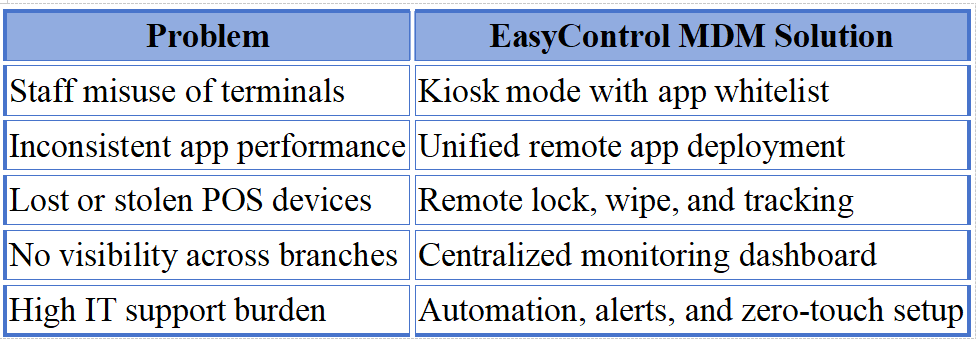
With EasyControl, what used to take days of manual effort can now be handled in minutes — remotely, and at scale.
Modern MDM vs. Traditional Device Management
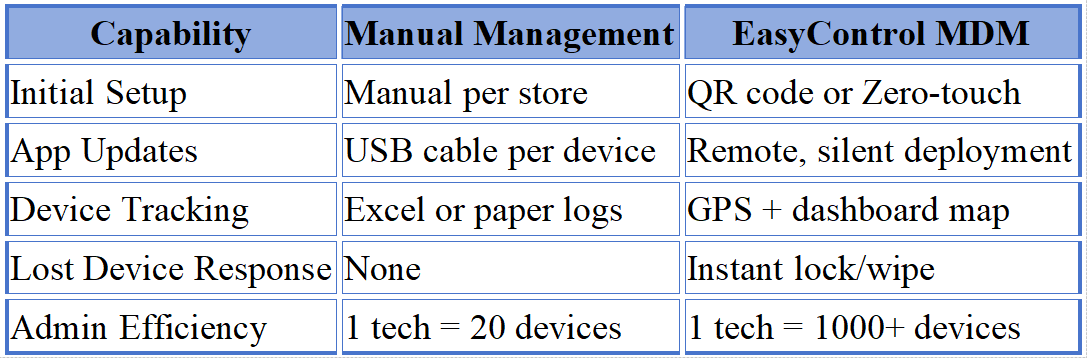
The shift to cloud-based MDM isn’t just about convenience — it’s about survivability in a digital economy.
Common Missteps When Managing POS Devices
Even tech-savvy teams sometimes make mistakes. Here are a few to avoid:
- Using consumer device settings for business POS
- Relying on app stores for updates instead of direct control
- Not disabling factory reset or developer options
- No password or biometric protection on staff devices
- Lack of visibility on device health or usage analytics
MDM platforms like EasyControl eliminate these risks with centralized, policy-driven enforcement.
Seamless Integration with Your Tech Stack
EasyControl provides open APIs and webhook capabilities to integrate with HR, POS software, inventory systems, or even customer engagement platforms.
Use Case Examples:
- Lock POS devices automatically when an employee resigns
- Sync device inventory data to your ERP system
- Push new menu updates to POS tablets when backend changes occur
These automations cut down manual workflows and reduce cross-department friction.
Industry Trend: POS Market Growth and Security Demands
According to a MarketsandMarkets industry report, the global POS terminal market is expected to grow from USD 81.2 billion in 2023 to USD 124.3 billion by 2028 — driven by the rise of cloud-based payment systems and digital-first customer experiences.
This explosive growth brings greater pressure to maintain:
- Uniform device behavior
- Compliance with security regulations
- Uptime during peak transaction periods
The only scalable way to manage thousands of distributed smart terminals is through cloud-based MDM.
Why Choose EasyControl?
At EasyControl, we’ve helped hundreds of companies in retail, food service, logistics, and healthcare industries manage their smart device fleets more effectively.
Why customers trust us:
- 100% cloud-native platform
- Support for Android, iOS, and custom enterprise devices
- Enterprise-grade security & data protection
- User-friendly dashboard for non-technical teams
- Custom analytics & usage insights
- API-level integrations with POS, HR, and CRM tools
Whether you’re managing 10 or 10,000 devices, EasyControl scales with your business.
Get Started Today
Managing your POS device fleet doesn’t have to be stressful, fragmented, or time-consuming. With EasyControl MDM, you can streamline the entire lifecycle of your smart terminals — from provisioning and app deployment to security enforcement and real-time monitoring — all from a single, cloud-based platform.
Imagine having full, real-time visibility across every device in your network — no more spreadsheets, no more guesswork. Whether you’re rolling out a software update to hundreds of terminals or responding instantly to a security incident on a lost device, EasyControl empowers your team to act fast and at scale.
You also gain the peace of mind that comes with consistent app versions across branches, enforced device usage policies, and automated compliance with security best practices. From a unified dashboard, IT administrators — even non-technical ones — can remotely lock down devices, push updates, monitor health metrics, and enforce geofencing rules with just a few clicks.
Now is the time to eliminate manual interventions, reduce support tickets, and future-proof your POS operations.
Ready to see it in action? Start your free trial or book a personalized demo with our team to explore how EasyControl MDM can fit your business needs.
Smart POS terminals are reshaping the customer experience — powering everything from self-service ordering to mobile payments. But as businesses scale, the challenge isn’t just in deploying these devices; it’s in managing them securely and efficiently.
Without a robust mobile device management strategy in place, companies risk exposing sensitive data, incurring downtime during critical hours, and draining IT resources on repetitive manual tasks. These risks grow exponentially with every additional terminal brought online.
With EasyControl MDM, you don’t just manage devices — you take control of your retail technology ecosystem. From remote app updates and custom device lockdowns, to real-time tracking and automated security policies, our platform is designed to help you scale without friction.
Whether you’re running 10 or 10,000 POS units, EasyControl brings you the tools to maintain operational excellence, reduce support costs, and deliver a consistent customer experience across every location.
Take the first step toward smarter POS device management today. Let EasyControl be the backbone of your terminal operations — and grow your business with confidence.
Tags
Related Articles
Blog
What Is iOS Device Management? Complete Guide
Why iOS Device Management Matters for Businesses iPhones and iPads have become useful tools for businesses of all sizes. Employees use them to communicate, access company applications, manage customer information, complete fieldwork, and perform everyday tasks. Schools, retailers, healthcare organizations, and hospitality businesses also rely on Apple devices for specialized operations. But managing one or...
Sep 15, 2026
Blog
Non Compliance and Compliance: A Guide to Compliance Risk Management
Managing hundreds or thousands of smartphones, tablets, rugged devices, and other enterprise endpoints is a major challenge for IT and security teams. Every device that accesses business applications or company data must meet defined security, configuration, application, and management requirements. Understanding device compliance and non-compliance helps organizations determine whether their devices meet these requirements. However,...
Aug 27, 2026
Blog
What Is a Conditional Access System and Why Is It Important for Zero Trust Security?
Quick Answer: A conditional access system is a security framework that evaluates user identity, device compliance, security policies, location, and risk before granting access to enterprise resources. It is a key part of Zero Trust security because it verifies every access request instead of automatically trusting users or devices. Introduction In the last decade, there...
Aug 10, 2026
Continue exploring EasyControl resources
Go deeper with documentation, strategic guides, customer stories, and video content across the resource center.