
Blog
What Is a Conditional Access System and Why Is It Important for Zero Trust Security?
Quick Answer: A conditional access system is a security framework that evaluates user identity, device compliance, security policies, location, and risk before granting access to enterprise resources. It is a key part of Zero Trust security because it verifies every access request instead of automatically trusting users or devices. Introduction In the last decade, there...
- Published
- Aug 10, 2026
- Updated
- Aug 27, 2026
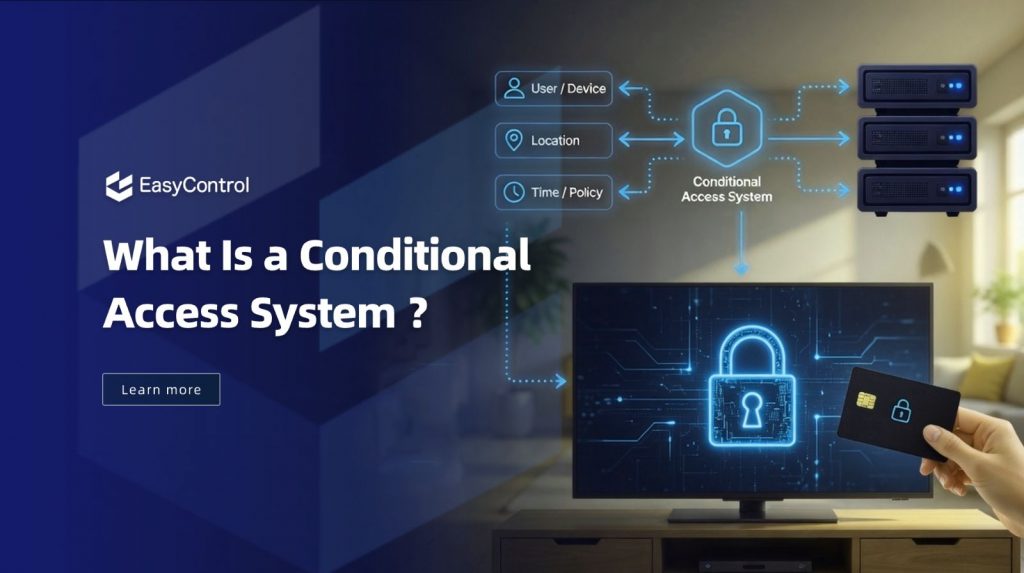
Quick Answer: A conditional access system is a security framework that evaluates user identity, device compliance, security policies, location, and risk before granting access to enterprise resources. It is a key part of Zero Trust security because it verifies every access request instead of automatically trusting users or devices.
Introduction
In the last decade, there has been a dramatic change in how organisations protect business resources. With the rapid adoption of cloud services, remote work, and mobile devices, employees are no longer accessing applications only from corporate offices. Instead, they’re logging in from home, customer locations, airports and other remote sites on laptops, smartphones, tablets and special enterprise devices. This change has increased flexibility and productivity but also introduces new security challenges.
Traditional security models relied on network boundaries and assumed trust for users inside the corporate network. However, in today’s distributed work environment, that assumption is no longer enough. Security threats may also come from legitimate users accessing sensitive data from an unmanaged or compromised device.
This is where a conditional access system becomes essential. By evaluating user identity, device trust, security policies, and contextual information before granting access, organizations can strengthen their Zero Trust security strategy. In this guide, you will learn what a conditional access system is, how it works, why device trust matters, and how Unified Device Management solutions like EasyControl help build a more secure enterprise environment.
Establishing this trust requires more than identity verification alone; it requires real-time visibility into device health and compliance. This is where Unified Device Management platforms like EasyControl play a critical role, giving organizations the device-level intelligence needed to power accurate conditional access decisions.
Why Traditional Security Models Are No Longer Enough
Today, employees may access enterprise resources from:
- Personal smartphones
- Corporate tablets
- Remote locations
- Public networks
- Cloud applications
The network perimeter has disappeared.
A user connected from the corporate office may not necessarily be secure, while a remote user with a compliant device may be trusted.
Zero Trust changed the security question from:
“Are you inside the corporate network?“
to:
“Are you authorized, and does your current environment meet security requirements?“
How Does a Conditional Access System Work?
So, now we know why traditional security models are insufficient. Let’s understand how a conditional access system works in practice.
Traditional security solutions depend on a single login event. Conditional access is a continuous evaluation of multiple security signals before granting access to enterprise resources.
- Are you the authorized user?
- Does the organization manage your device?
- Does the device comply with security policies?
- Are you signing in from a trusted location?
- Does this login appear risky or unusual?
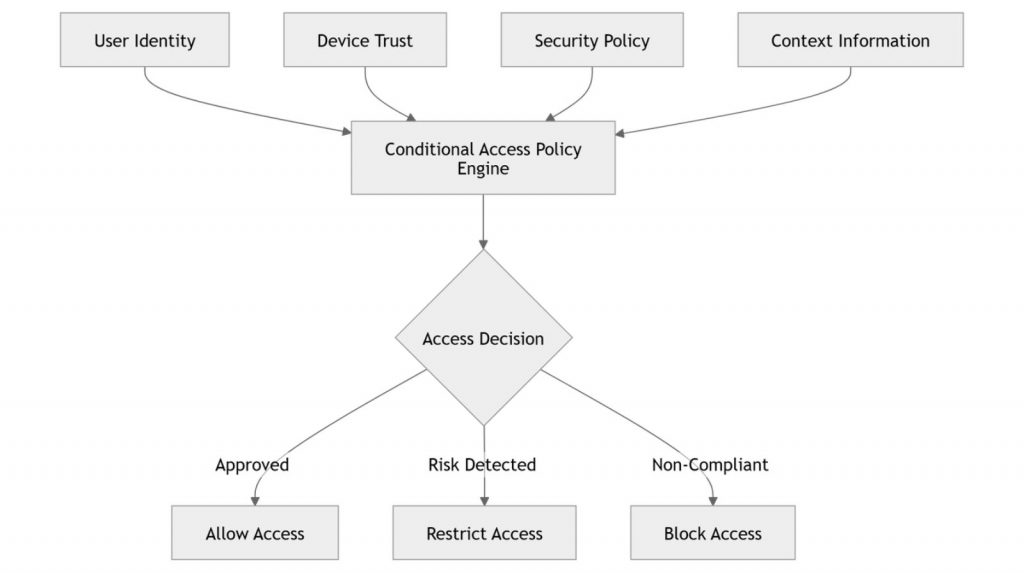
It then takes one of the possible actions, that is, allow, restrict, or block access, based on an evaluation of these conditions. Conditional access is an important part of a Zero Trust security strategy because of its multi-layered approach. Your manager’s reference diagram shows the same decision flow, where the system takes into account identity, device trust, security policy, and contextual information before making an access decision.
Important Note: A conditional access system looks at who the user is, how trusted the device is, security policies and contextual information, and then decides whether to allow, restrict or block access.
Figure 1. Conditional Access Decision Workflow
Understanding the Workflow
The image below shows the 4 important variables a conditional access system looks into before allowing access. It doesn’t just depend on who the user is, it uses identity verification, device trust, security policies and contextual information to determine whether to grant, limit or deny access.
1. User Identity
First, the user’s identity must be confirmed using techniques like passwords, Single Sign-On (SSO), or Multi-Factor Authentication (MFA). If the system cannot identify the user, it denies access immediately.
2. Device Trust
Next, the system checks the device security and compliance. Before granting access it checks device management status, encryption, operating system updates and compliance with company security policies.
Note: The specific compliance checks available such as encryption status or OS-level restrictions, can vary depending on the device platform (Android, iOS, Windows, etc.).
3. Security Policies
Organisations set security rules appropriate to their business needs. For example, you can restrict sensitive apps to only be accessible from managed devices or require MFA before sign-in.
4. Contextual Information
Finally, the system analyses contextual signals, such as the user’s location, network, login behaviour, device risk, etc. The system may require additional verification or block access if it detects unusual activity.
How the Access Decision Is Made
Once all four signals have been evaluated, the system makes one of three decisions:
| Decision | What It Means |
| Allow | The user and device meet all security requirements, so full access is granted. |
| Restrict | Access is limited until additional verification or remediation is completed. |
| Block | The request violates security policies or presents an unacceptable level of risk. |
This dynamic approach is far more effective than traditional security models because every access request is evaluated individually instead of relying on a single login event.
A Real-World Example
Consider Sarah, a sales manager who is on the road and needs access to her company’s CRM.
She logs in with the correct username and password and completes the Multi-Factor Authentication (MFA) successfully.
In a traditional security model, she would likely receive immediate access.
With a conditional access system, however, additional checks take place before access is granted.
The system verifies that:
- Sarah is a legitimate employee.
- Her company-issued tablet is enrolled in device management.
- The operating system is up to date.
- Device encryption is enabled.
- No high-risk activity has been detected.
- The login complies with company security policies.
Because all conditions are satisfied, access is approved without interrupting Sarah’s work.
Now imagine the same login attempt is made from an unmanaged personal device running an outdated operating system. Even though Sarah’s identity is valid, the system may block access or require her to switch to a compliant device before accessing sensitive company data.
This example demonstrates why modern enterprise security is no longer based solely on who the user is. It also depends on how, where, and from which device the user is accessing business resources.
Key Components of a Conditional Access System
A conditional access system doesn’t rely on a single security check. Instead, it combines multiple security layers to make accurate and risk-based access decisions.
| Component | Purpose |
| Identity Verification | Confirms the user is authorized through authentication methods such as MFA or SSO. |
| Device Trust | Verifies that the endpoint is managed, secure, and compliant. |
| Security Policies | Applies organizational rules to determine access permissions. |
| Context Awareness | Evaluates factors like location, device health, network, and risk level. |
| Continuous Monitoring | Periodically re-evaluates access signals during a session rather than relying solely on the initial login event. |
The Evolution of Zero Trust: From Identity Trust to Device Trust
When Zero Trust security was first introduced, organizations primarily focused on verifying who was accessing enterprise resources through technologies like Multi-Factor Authentication (MFA), Single Sign-On (SSO), Active Directory, Microsoft Entra ID, and Identity and Access Management (IAM) platforms. While these solutions strengthened identity security, the rise of remote work, cloud applications, and mobile devices exposed a new challenge: the security of the device itself.
A legitimate user accessing business data from an unmanaged or compromised device can still create significant security risks. That’s why a modern conditional access system verifies both user identity and device trust, ensuring access is granted only when both meet the organization’s security requirements.
Identity Trust vs. Device Trust
Zero Trust security doesn’t rely on a single layer of protection. Instead, it combines identity verification with device trust to ensure that only authorized users on secure devices can access enterprise resources.
Identity Trust and Device Trust in a Zero Trust Framework
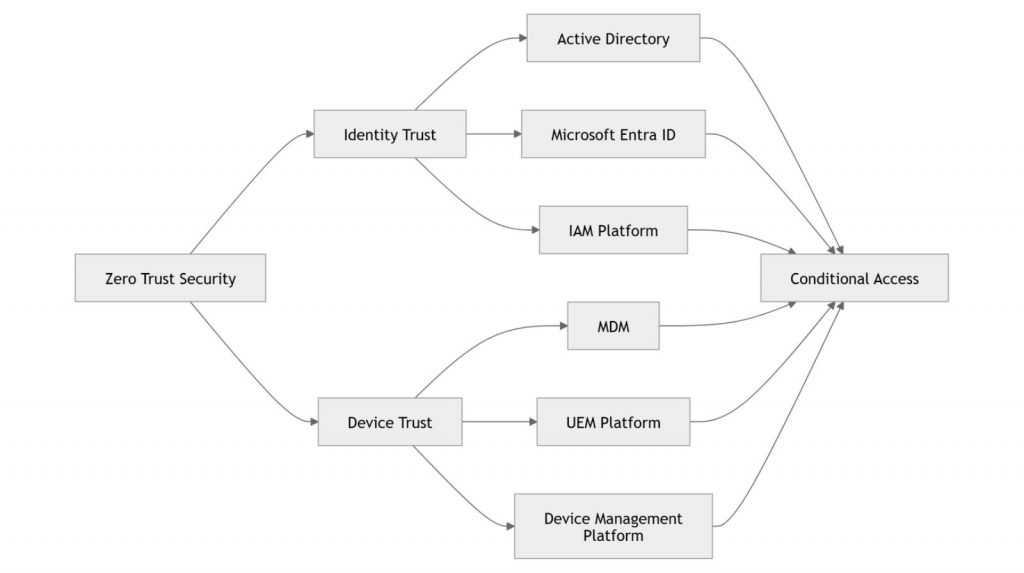
Figure 2. Identity trust and device trust work together to strengthen conditional access decisions in a Zero Trust environment.
The diagram above illustrates that identity platforms such as Active Directory, Microsoft Entra ID, and other IAM solutions authenticate users, while MDM, UEM, and enterprise device management platforms verify device security and compliance. A conditional access system combines these trust signals to decide whether access should be allowed, restricted, or denied.
Identity Trust
Identity trust verifies that the person requesting access is genuinely authorized. It relies on user authentication, Multi-Factor Authentication (MFA), Single Sign-On (SSO), user permissions, and role-based access control (RBAC). Identity platforms ensure only verified users can access business resources, reducing the risk of unauthorized access.
Device Trust
Device trust verifies that the endpoint accessing company resources is secure and compliant. It checks whether the device is enrolled in enterprise management, meets compliance requirements, runs a supported operating system, has encryption enabled, follows security policies, and is free from known security risks before granting access.
Why Mobile Device Management Is Becoming a Critical Security Layer
Verizon’s 2025 data breach research found that 46% of enterprise-level compromised systems were unmanaged devices, often mixing personal and professional credentials — underscoring why device visibility has become as critical as identity verification
As organisations move more smartphones, tablets, kiosks and rugged devices online, mere verification of who the user is won’t cut it. What’s become known as Mobile Device Management today has evolved from device management to an essential security layer for establishing and maintaining trust in devices. It regularly checks device compliance, OS updates, encryption status, application security, and policy adherence. This device intelligence provides the trust signals that conditional access systems rely on to make informed access decisions.
The Modern Device Lifecycle
A modern UDM platform supports the entire device lifecycle—from secure enrollment and policy configuration to continuous compliance monitoring and secure device retirement—ensuring devices remain trusted throughout their lifecycle.
What to Look for in Conditional Access System Software
Not all security solutions offer the same level of protection. Choosing the right conditional access system software means selecting a platform that combines identity verification with device intelligence and policy enforcement.
Key capabilities to look for include:
Identity Verification
Support for MFA, SSO, passwordless authentication, and integration with enterprise identity providers.
Device Compliance
The ability to verify whether devices are managed, encrypted, patched, and compliant before granting access.
Risk-Based Policies
Dynamic policies that consider user identity, device status, location, and risk signals instead of relying on static rules.
Continuous Monitoring
Monitors device status and security-related conditions to help inform access decisions when device conditions change.
Integration with MDM and UDM
The best conditional access system software integrates seamlessly with MDM and UDM solutions. This allows access decisions to be based on real-time device compliance rather than identity alone.
How EasyControl Supports Zero Trust Device Management
Zero Trust requires organizations to continuously verify not only users, but also the devices they use to access business resources. EasyControl supports this approach by managing devices throughout their lifecycle—from enrollment and configuration to monitoring, compliance, and retirement—helping organizations maintain trusted and secure device access:
- Secure Enrollment – Android Enterprise, QR provisioning, Zero-touch deployment
- Policy Enforcement – centralized configuration, password policies, app restrictions
- Application Management – allow-listing, Kiosk Mode, remote app control
- Compliance Monitoring – continuous device health and compliance checks
- Remote Operations – remote configuration, troubleshooting, and management from a single console
Benefits of Implementing a Conditional Access System
Imagine an employee working remotely from a hotel Wi-Fi network. Instead of automatically allowing access after login, the conditional access system checks whether the laptop is encrypted, managed, and compliant before granting access. This helps prevent sensitive business data from being accessed through insecure devices.
Some of the key benefits include:
- Reduces the risk of unauthorized access.
- Protects sensitive business applications and cloud services.
- Supports Zero Trust security initiatives.
- Verifies both user identity and device compliance.
- Enables secure remote and hybrid work.
- Helps organizations meet internal security policies and compliance requirements.
- Improves visibility into user and device activity.
- Reduces IT risks associated with unmanaged or compromised devices.
Best Practices for Implementing Conditional Access
Deploying a conditional access system is only the first step. To maximize its effectiveness, organizations should follow these best practices:
- Enforce Multi-Factor Authentication (MFA)
- Verify Device Compliance
- Apply Least-Privilege Access
- Monitor Devices Continuously
- Block High-Risk Devices
- Review Policies Regularly
Conclusion
As organizations embrace cloud services, hybrid work, and enterprise mobility, traditional security models are no longer enough. A conditional access system strengthens Zero Trust security by verifying both user identity and device trust before granting access. When combined with Mobile Device Management or Unified Device Management, organizations can monitor device compliance, enforce security policies, and help protect sensitive business data as device conditions evolve. By integrating identity verification with device security, businesses can build a more resilient, compliant, and future-ready access strategy.
Frequently Asked Questions
A conditional access system is a security framework that evaluates user identity, device trust, security policies, and contextual information before granting access to enterprise resources. It is a fundamental part of Zero Trust security because every access request is verified before access is allowed.
It evaluates multiple security signals—including user authentication, device compliance, location, network conditions, and organizational policies—to determine whether access should be allowed, restricted, or blocked.
Identity verification confirms who the user is, while device trust confirms whether the device is secure. Together, they provide a stronger foundation for making secure access decisions.
Conditional access system software helps organizations automate access decisions by combining identity verification, device compliance, contextual risk analysis, and policy enforcement into a unified security framework.
Yes. MDM solutions provide valuable information about device health, compliance, and security status. This allows conditional access policies to make more informed decisions before granting access.
Tags
Related Articles
Blog
What Is iOS Device Management? Complete Guide
Why iOS Device Management Matters for Businesses iPhones and iPads have become useful tools for businesses of all sizes. Employees use them to communicate, access company applications, manage customer information, complete fieldwork, and perform everyday tasks. Schools, retailers, healthcare organizations, and hospitality businesses also rely on Apple devices for specialized operations. But managing one or...
Sep 15, 2026
Blog
Non Compliance and Compliance: A Guide to Compliance Risk Management
Managing hundreds or thousands of smartphones, tablets, rugged devices, and other enterprise endpoints is a major challenge for IT and security teams. Every device that accesses business applications or company data must meet defined security, configuration, application, and management requirements. Understanding device compliance and non-compliance helps organizations determine whether their devices meet these requirements. However,...
Aug 27, 2026
Blog
What Is Android Fastboot Mode?
Quick Answer: Android Fastboot Mode is a low level bootloader interface that allows OEMs, manufacturers and authorised technicians to prepare, test, recover and maintain Android devices before the operating system boots. In an enterprise Android deployment, Fastboot prepares the devices for use, and Android device management platforms such as EasyControl handle enrolment, security, application management,...
Jul 31, 2026
Continue exploring EasyControl resources
Go deeper with documentation, strategic guides, customer stories, and video content across the resource center.