
Blog
How to Manage Enterprise iPhones and iPads with EasyControl MDM
Manage enterprise iPhones and iPads with MDM to enhance security, streamline app deployment, and enable remote management.
- Published
- Mar 31, 2025
- Updated
- Jun 11, 2026
The Hottest Topic in IT: Managing Company iPhones and iPads
If you ask IT teams what’s driving them crazy, nine out of ten will say: Managing company-issued iPhones and iPads!
- Setting up devices for new employees takes forever.
- Sales teams worry about sensitive data leaks when using iPads with clients.
- Lost or stolen devices create major security risks.
No worries! This guide will show you how Mobile Device Management (MDM) can solve all these headaches in one go.
What Can MDM Do for iOS Device Management?
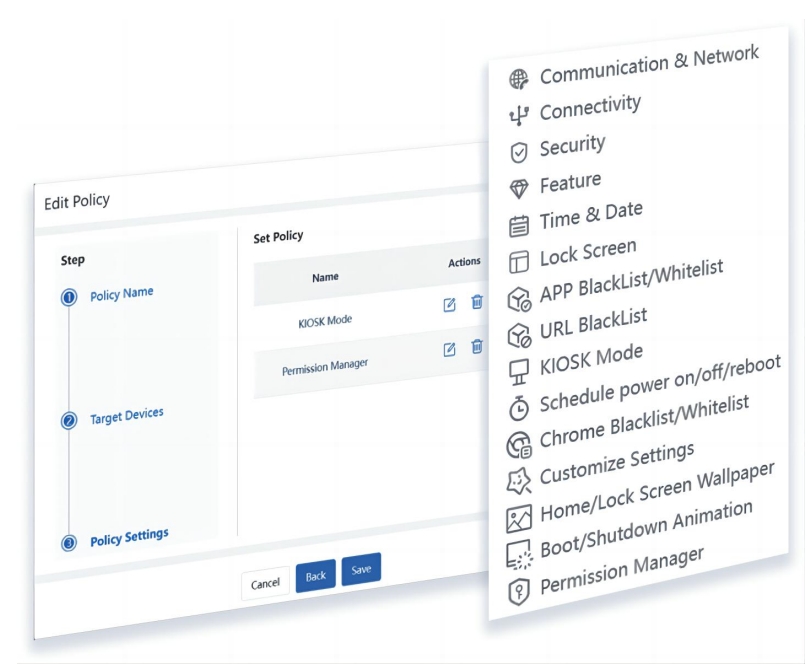
Here’s a real-world case: A sales director at a financial firm lost his iPad. Within 2 hours, MDM remotely wiped customer data, locked the screen, and pinpointed the device’s location. When the device was recovered, all sensitive information had been erased—problem solved!
MDM primarily tackles 3 key areas:
1. Seamless Application Distribution and Management
One of the standout benefits of MDM is its ability to efficiently distribute and manage applications across corporate iPhones and iPads. IT administrators can remotely push applications from the App Store or deploy custom enterprise apps, eliminating the need for manual installation.
Moreover, MDM enables organizations to:
- Whitelist and blacklist applications, ensuring employees only access business-approved tools.
- Silently install or remove applications, preventing users from tampering with essential work-related apps.
- Enforce app configurations, so business apps come preloaded with necessary settings, reducing setup time.
2. Enforcing Robust Security and Compliance Policies
Security is a top concern for any business managing mobile devices. MDM allows organizations to enforce strict security measures, protecting corporate data from unauthorized access and potential breaches.
Key security features include:
- Passcode Enforcement: Ensure devices are secured with strong, complex passwords to prevent unauthorized use.
- Encryption Enforcement: Guarantee that all data stored on iPhones and iPads is encrypted, adding an extra layer of security.
- Feature Restrictions: Disable high-risk features like AirDrop, USB file transfers, and iCloud backups to minimize data leakage.
- Wi-Fi and VPN Configurations: Secure corporate network access by enforcing encrypted VPN connections and predefined Wi-Fi settings.
3. Remote Device Management and Data Protection
Managing a distributed fleet of mobile devices is easier with MDM’s remote capabilities. IT administrators can monitor device health, ensure compliance, and take action if a device is lost, stolen, or compromised.
Critical remote management features include:
- Remote Wipe: Instantly erase all corporate data from a lost or stolen device, preventing unauthorized access.
- Lost Mode & Location Tracking: Lock and locate missing devices, displaying custom messages for recovery.
- Factory Reset Prevention: Block unauthorized attempts to reset devices, ensuring corporate security policies remain intact.
Why Enterprises Need MDM for iOS Devices
A major manufacturing company once spent 50% of its IT resources on password resets, and a departing salesperson walked away with 20GB of client data. After implementing MDM:
✅ New device setup time shrank from 2 hours to 10 minutes
✅ Zero data breaches
✅ Saved $30,000+ per year in outsourced IT support
A Success Story: MDM in Action
A logistics company deployed MDM for 2000 courier iPads and saw incredible results:
- 70% fewer device repairs (IT resolved software issues remotely).
- 15 extra deliveries per driver daily (less time wasted on tech problems).
- Secured a major international contract (thanks to their strong data security policies).
Try EasyControl MDM for Free
Most leading MDM providers offer free trials. Don’t just take our word for it. sign up for a test account today and experience the power of remote data wipe yourself!
Tags
Related Articles
Blog
What Is iOS Device Management? Complete Guide
Why iOS Device Management Matters for Businesses iPhones and iPads have become useful tools for businesses of all sizes. Employees use them to communicate, access company applications, manage customer information, complete fieldwork, and perform everyday tasks. Schools, retailers, healthcare organizations, and hospitality businesses also rely on Apple devices for specialized operations. But managing one or...
Sep 15, 2026
Blog
Non Compliance and Compliance: A Guide to Compliance Risk Management
Managing hundreds or thousands of smartphones, tablets, rugged devices, and other enterprise endpoints is a major challenge for IT and security teams. Every device that accesses business applications or company data must meet defined security, configuration, application, and management requirements. Understanding device compliance and non-compliance helps organizations determine whether their devices meet these requirements. However,...
Aug 27, 2026
Blog
What Is a Conditional Access System and Why Is It Important for Zero Trust Security?
Quick Answer: A conditional access system is a security framework that evaluates user identity, device compliance, security policies, location, and risk before granting access to enterprise resources. It is a key part of Zero Trust security because it verifies every access request instead of automatically trusting users or devices. Introduction In the last decade, there...
Aug 10, 2026
Continue exploring EasyControl resources
Go deeper with documentation, strategic guides, customer stories, and video content across the resource center.