
Blog
How MDM Simplifies Device Management for Schools
Mobile Device Management (MDM) simplifies school IT by enabling remote device control, app restrictions, and cybersecurity enforcement.
- Published
- Mar 24, 2025
- Updated
- Jun 11, 2026

Image Source: unsplash
Managing devices in schools can be overwhelming without the right tools. Mobile Device Management helps you simplify this process by offering centralized control and faster access to resources. Many IT administrators spend over 20 hours each week manually enrolling devices. Teachers often wait weeks for new software installations, delaying lessons. Technology issues disrupt class time frequently, with teachers submitting multiple trouble tickets every month. MDM reduces these challenges, creating a smoother digital learning experience for everyone involved.
Key Takeaways
- Mobile Device Management (MDM) makes managing school devices easier. It saves IT staff time and cuts down on manual work.
- MDM helps classrooms run smoothly by quickly updating software and adding apps. Teachers get the tools they need right away.
- Schools use MDM to set security rules and block non-educational content. This keeps students safe while learning.
- MDM lets schools track and check devices from far away. It helps protect important data and handle lost or stolen devices.
- Regular training and policy checks are key to using MDM well. This helps staff and students make the most of the system.
Understanding Mobile Device Management in Schools
What is Mobile Device Management?
Mobile Device Management refers to software solutions that allow you to control and manage devices like tablets, laptops, and smartphones from a central platform. It enables you to configure settings, install applications, and monitor device usage remotely. This technology ensures that all devices in your school operate efficiently and securely, providing a seamless digital learning experience.
The Role of MDM in Education
In schools, Mobile Device Management plays a crucial role in supporting both teaching and learning. It helps you distribute educational apps and resources to students and teachers without delays. You can also customize devices to meet specific classroom needs, ensuring that students only access approved content. By using MDM, you create a structured and distraction-free digital environment that enhances focus and productivity.
Additionally, MDM simplifies IT management. You can troubleshoot technical issues remotely, reducing downtime and minimizing disruptions during lessons. This ensures that technology supports education rather than hindering it.
Why Schools Need MDM Solutions
Modern schools face unique challenges that make Mobile Device Management essential. Consider the following:
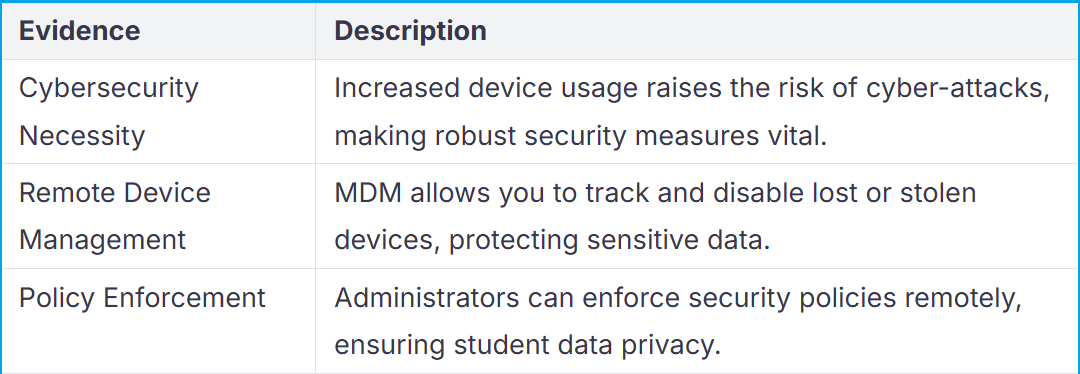
MDM also provides a centralized platform for managing devices across different operating systems. You can track device usage efficiently and enforce digital policies to maintain a safe learning environment. By adopting MDM, you ensure that your school stays ahead in meeting modern educational demands.
Key Benefits of Mobile Device Management

Image Source: unsplash
For Educators
Streamlined access to teaching tools
You can save valuable teaching time with Mobile Device Management. It ensures that all devices are preloaded with the necessary educational apps and tools. Teachers no longer need to wait weeks for software installations. Instead, MDM allows IT administrators to deploy updates and applications instantly. This efficiency helps you focus on delivering lessons rather than troubleshooting technology issues.
Customizable content delivery
MDM empowers you to tailor digital content to meet your classroom’s unique needs. You can ensure that students only access approved materials, creating a distraction-free learning environment. By customizing devices for specific subjects or grade levels, you can enhance engagement and make lessons more impactful.
For IT Administrators
Centralized device control
Managing hundreds of devices becomes effortless with MDM. From a single dashboard, you can configure settings, enforce security policies, and monitor device usage. This centralization eliminates the need for manual interventions, saving you time and reducing errors. For example:
- MDM automates routine tasks like patching and monitoring.
- It allows you to track and secure devices remotely, ensuring compliance with school policies.
- You can enforce rules that restrict access to unauthorized apps or websites.
Reduced maintenance workload
MDM significantly lightens your workload by automating repetitive tasks. Studies show that 70% of IT admins spend over 20 hours weekly enrolling devices manually. MDM eliminates this inefficiency, enabling you to allocate time to more critical tasks. Additionally, it reduces the number of trouble tickets submitted by teachers, which often average three or more per month. This streamlined approach ensures that your IT team operates more effectively.
For Parents
Enhanced student safety
MDM provides peace of mind by ensuring that students use devices safely. It enforces security policies that restrict access to harmful websites and apps. Features like content filtering ensure that students only engage with appropriate educational resources. Additionally, MDM safeguards sensitive student information, protecting their privacy and complying with data protection regulations.
Transparency in device usage
With MDM, you gain insights into how devices are used. Schools can monitor app usage, track device locations, and configure settings like passcode requirements. This transparency assures you that your child’s device is being used responsibly. It also allows schools to address any misuse promptly, fostering a secure and productive learning environment.
Essential Features of Mobile Device Management
Device Control Capabilities
Remote configuration and updates
You can manage devices across your school without needing physical access. Mobile Device Management platforms allow you to configure settings, install updates, and troubleshoot issues remotely. This feature ensures that all devices remain up-to-date and functional, minimizing disruptions during lessons. For example, IT administrators can push software updates to hundreds of devices simultaneously, saving time and effort.
Device tracking and monitoring
Tracking and monitoring devices is essential for maintaining security and accountability. With Mobile Device Management, you can locate lost or stolen devices and monitor their usage. This capability helps protect sensitive data and ensures that devices are used responsibly. Features like automated reporting and compliance monitoring provide additional insights into device activity, helping you enforce school policies effectively.
Content Management Tools
Distribution of educational apps and materials
Distributing educational resources becomes seamless with Mobile Device Management. You can deploy apps, e-books, and other materials to student and teacher devices instantly. This eliminates delays that often occur with manual installations. A recent study found that 70% of IT administrators spend over 20 hours weekly enrolling devices manually, while 60% of teachers wait over two weeks for new software installations. MDM addresses these inefficiencies, ensuring that classrooms have the tools they need without delay.
Restriction of non-educational content
You can create a focused learning environment by restricting access to non-educational content. Mobile Device Management platforms allow you to blacklist distracting apps and websites while whitelisting approved resources. This ensures that students stay engaged with their studies and avoid unnecessary distractions. By enforcing these restrictions, you promote a safe and productive digital space for learning.
Security Enhancements
Data encryption and protection
Protecting sensitive information is a top priority for schools. Mobile Device Management platforms offer robust data encryption to safeguard student and staff data. This feature ensures that even if a device is lost or stolen, the information remains secure. Password enforcement and remote wipe capabilities further enhance data protection, giving you peace of mind.
Prevention of unauthorized access
Preventing unauthorized access is critical for maintaining a secure digital environment. Mobile Device Management solutions enforce strict access controls, such as password requirements and multi-factor authentication. These measures ensure that only authorized users can access school devices and data. By implementing these security features, you reduce the risk of cyber threats and protect your school’s digital infrastructure.
Real-World Applications of Mobile Device Management

Image Source: pexels
Case Studies of Successful MDM Implementation
Many schools have already transformed their digital learning environments with Mobile Device Management. For example, a large public school district in California implemented MDM to manage over 10,000 student devices. Before MDM, IT administrators struggled to keep devices updated and secure. After deploying MDM, they could remotely install updates, enforce security policies, and track device usage. This reduced downtime and improved classroom efficiency.
Another success story comes from a private school in Texas. The school used MDM to customize devices for different grade levels. Younger students received access to basic educational apps, while older students used advanced tools for research and collaboration. Teachers reported fewer distractions and more engagement during lessons. These examples highlight how MDM can address specific challenges and improve outcomes in diverse educational settings.
Practical Scenarios in Schools
Managing student and teacher devices
You can use MDM to manage both student and teacher devices effectively. For students, MDM ensures that devices are preloaded with the right apps and resources. Teachers benefit from having their devices configured for lesson planning and classroom management. For instance, you can remotely push updates or troubleshoot issues without disrupting the school day. This centralized approach saves time and ensures that all devices function optimally.
Ensuring compliance with digital policies
MDM helps you enforce digital policies across all devices. You can restrict access to non-educational content and ensure that students follow acceptable use guidelines. For example, MDM allows you to block social media apps during school hours. It also ensures compliance with data protection laws by encrypting sensitive information. These features create a safe and focused digital environment for learning.
Tip: Regularly review your MDM policies to adapt to new challenges and technologies.
Choosing and Deploying the Right Mobile Device Management Solution
Key Factors to Consider
Compatibility with existing infrastructure
When selecting a Mobile Device Management solution, you must ensure it integrates seamlessly with your school’s current systems. Check if the platform supports the devices and operating systems already in use. For example, if your school uses a mix of iPads and Chromebooks, the MDM solution should manage both effectively. Compatibility reduces the risk of technical issues and ensures a smoother deployment process.
Scalability for future needs
Your school’s technology needs will grow over time. Choose an MDM solution that can scale as you add more devices or expand to new campuses. Look for features like flexible licensing options and support for a large number of devices. A scalable solution ensures your investment remains valuable as your school evolves.
Tip: Evaluate MDM solutions based on key metrics such as security, compliance, deployment efficiency, and user experience. These factors help you identify a platform that meets your school’s unique requirements.
Best Practices for Implementation
Training staff and students
Proper training is essential for the successful implementation of Mobile Device Management. Educators and students need to understand how to use the system effectively. Conduct workshops or provide online tutorials to familiarize them with key features. Adequate training ensures everyone can maximize the benefits of the MDM solution while minimizing confusion.
Regular updates and policy reviews
Technology and educational needs change frequently. Regularly update your MDM policies to address new challenges and opportunities. Schedule periodic reviews to ensure the system aligns with your school’s goals. For instance, you might need to adjust content restrictions or add new security measures. Staying proactive keeps your MDM solution effective and relevant.
Note: Schools that enforce policies, track device usage, and troubleshoot issues efficiently report fewer disruptions and higher productivity. Providing ongoing technical support ensures the system continues to meet your school’s needs.
Mobile Device Management helps you create a secure and efficient digital learning environment. It simplifies device management, reduces IT workloads, and enhances collaboration between educators and students. By adopting the right solution, you can protect sensitive data, enforce digital policies, and ensure devices are always ready for learning. This technology empowers your school to focus on improving educational outcomes while staying ahead in the digital age.
FAQ
What types of devices can MDM manage?
MDM can manage a variety of devices, including tablets, laptops, and smartphones. It supports different operating systems like iOS, Android, Windows, and ChromeOS. This flexibility ensures that your school can manage all devices efficiently, regardless of the brand or platform.
How does MDM improve cybersecurity in schools?
MDM enhances cybersecurity by enforcing strict access controls, encrypting sensitive data, and preventing unauthorized access. It also allows you to track and disable lost or stolen devices. These features protect student information and ensure compliance with data protection regulations.
Can MDM help reduce IT workload?
Yes, MDM automates repetitive tasks like software updates, device enrollment, and troubleshooting. This reduces the time IT administrators spend on manual processes. It also minimizes the number of technical issues reported by teachers, allowing IT teams to focus on critical tasks.
Is MDM difficult to implement in schools?
MDM solutions are designed for easy implementation. Most platforms offer user-friendly interfaces and step-by-step guides. With proper training for staff and students, you can deploy MDM quickly and start managing devices efficiently.
How does MDM benefit students directly?
MDM ensures that students only access approved educational content, creating a focused learning environment. It also protects their privacy by securing sensitive data. These features help students stay engaged and safe while using digital devices for learning.
Tip: Choose an MDM solution that aligns with your school’s specific needs to maximize these benefits.
Tags
Related Articles
Blog
What Is iOS Device Management? Complete Guide
Why iOS Device Management Matters for Businesses iPhones and iPads have become useful tools for businesses of all sizes. Employees use them to communicate, access company applications, manage customer information, complete fieldwork, and perform everyday tasks. Schools, retailers, healthcare organizations, and hospitality businesses also rely on Apple devices for specialized operations. But managing one or...
Sep 15, 2026
Blog
Non Compliance and Compliance: A Guide to Compliance Risk Management
Managing hundreds or thousands of smartphones, tablets, rugged devices, and other enterprise endpoints is a major challenge for IT and security teams. Every device that accesses business applications or company data must meet defined security, configuration, application, and management requirements. Understanding device compliance and non-compliance helps organizations determine whether their devices meet these requirements. However,...
Aug 27, 2026
Blog
What Is a Conditional Access System and Why Is It Important for Zero Trust Security?
Quick Answer: A conditional access system is a security framework that evaluates user identity, device compliance, security policies, location, and risk before granting access to enterprise resources. It is a key part of Zero Trust security because it verifies every access request instead of automatically trusting users or devices. Introduction In the last decade, there...
Aug 10, 2026
Continue exploring EasyControl resources
Go deeper with documentation, strategic guides, customer stories, and video content across the resource center.