
Blog
Android vs iOS Device Management: How Should Enterprises Choose?
Compare Android vs iOS enterprise device management with EasyControl. Learn how to choose the right MDM solution based on security, flexibility
- Published
- Mar 11, 2025
- Updated
- Jun 11, 2026
When managing company devices, Android and iOS are two major options. Businesses should choose based on security, flexibility, app management, and usage scenarios. This article compares Android Enterprise and Apple MDM to help companies make an informed decision.
1. Device Management Modes
Android Enterprise offers 3 management options:
- Work Profile: Ideal for BYOD (Bring Your Own Device), separating work and personal data.
- Fully Managed Device: Best for company-owned devices with full admin control.
- Dedicated Device: Suitable for retail and logistics, supporting Kiosk mode.
Apple MDM provides 2 main management modes:
- Device Enrollment: Suitable for company devices, allowing full IT control.
- User Enrollment: Designed for BYOD, ensuring company data security while protecting employee privacy.
2. Security & Compliance
Android Enterprise
- Uses Google Play Protect to detect malware.
- Supports SafetyNet API to check device integrity and prevent tampering.
- Suitable for companies needing custom management, but security levels vary by manufacturer.
Apple MDM
- All iOS devices follow Apple’s strict security standards.
- DEP (Device Enrollment Program) ensures company devices are ready to use and prevents management bypass.
- Supports full data encryption and enforces security policies to meet compliance requirements.
3. Application & Content Management
Android Enterprise
- Uses Managed Google Play for centralized app distribution and management.
- Allows admins to control app permissions to protect company data.
- Integrates with third-party MDM solutions for flexible policy management.
Apple MDM
- Uses Apple Business Manager (ABM) for app distribution.
- Supports Volume Purchase Program (VPP) for bulk app purchases.
- Enables remote app installation, updates, and removal to ensure compliance.
4. Device Choice & Management Depth
Android Enterprise is ideal for businesses needing a variety of devices with more customization options.
Apple MDM is best for companies using Apple devices, ensuring a consistent and secure experience.
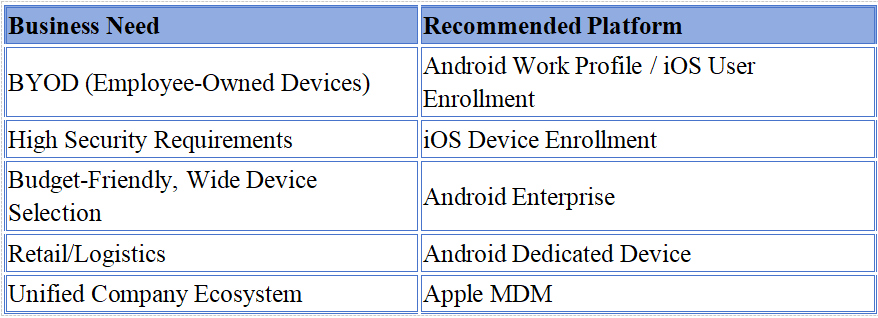
5. Recommended Use Cases
6. How to Choose the Right MDM Solution?
If a company values security and a unified management system, Apple MDM is a strong option, especially for businesses already using Apple devices. If flexibility and a wide range of device choices are priorities, Android Enterprise is a better choice. Businesses should evaluate their needs and select the best solution accordingly.
Tags
Related Articles
Blog
What Is iOS Device Management? Complete Guide
Why iOS Device Management Matters for Businesses iPhones and iPads have become useful tools for businesses of all sizes. Employees use them to communicate, access company applications, manage customer information, complete fieldwork, and perform everyday tasks. Schools, retailers, healthcare organizations, and hospitality businesses also rely on Apple devices for specialized operations. But managing one or...
Sep 15, 2026
Blog
Non Compliance and Compliance: A Guide to Compliance Risk Management
Managing hundreds or thousands of smartphones, tablets, rugged devices, and other enterprise endpoints is a major challenge for IT and security teams. Every device that accesses business applications or company data must meet defined security, configuration, application, and management requirements. Understanding device compliance and non-compliance helps organizations determine whether their devices meet these requirements. However,...
Aug 27, 2026
Blog
What Is a Conditional Access System and Why Is It Important for Zero Trust Security?
Quick Answer: A conditional access system is a security framework that evaluates user identity, device compliance, security policies, location, and risk before granting access to enterprise resources. It is a key part of Zero Trust security because it verifies every access request instead of automatically trusting users or devices. Introduction In the last decade, there...
Aug 10, 2026
Continue exploring EasyControl resources
Go deeper with documentation, strategic guides, customer stories, and video content across the resource center.