
Blog
Is Your Phone Monitored by MDM Lock? How to Check & What It Means!
Learn how to detect if your phone has an MDM lock or is monitored. Explore MDM features and use cases for enhanced device security.
- 发布日期
- 2025年2月13日
- 更新日期
- 2026年6月11日
You’ve just bought a new phone, and while it looks fully functional, you notice certain limitations. Maybe you can’t install or uninstall certain apps, or you receive a “device is managed” notification when trying to change settings. Perhaps the device automatically installs certain apps, or you can’t access certain system functions (like Wi-Fi settings or developer options). These signs may indicate that your phone is a monitored device with an MDM lock enabled. This article will explain what an MDM lock is and how to check if your phone is being monitored.
What Is an MDM Lock?
An MDM (Mobile Device Management) lock is a security feature installed on a device that allows remote control and management. It enables organizations to remotely manage and protect mobile devices, such as smartphones and tablets. Companies, schools, and other organizations often use MDM locks to safeguard sensitive data and ensure that device usage complies with their policies. MDM locks typically include features like strong password policies, multi-factor authentication, and device usage restrictions.
The process of using an MDM lock involves several steps:
1. Registration: The device registers with the MDM solution by installing a management profile, allowing administrators to control various settings and functions.
2. Remote Control: Administrators can remotely enforce policies and restrictions, such as password requirements, app limitations, data encryption, and remote wipe.
3. MDM Lock Activation: In case the device is lost, stolen, or at risk, administrators can activate the MDM lock to lock the device and prevent unauthorized access.
How to Tell If Your Phone Is a Monitored Device or Has an MDM Lock
For Android Devices
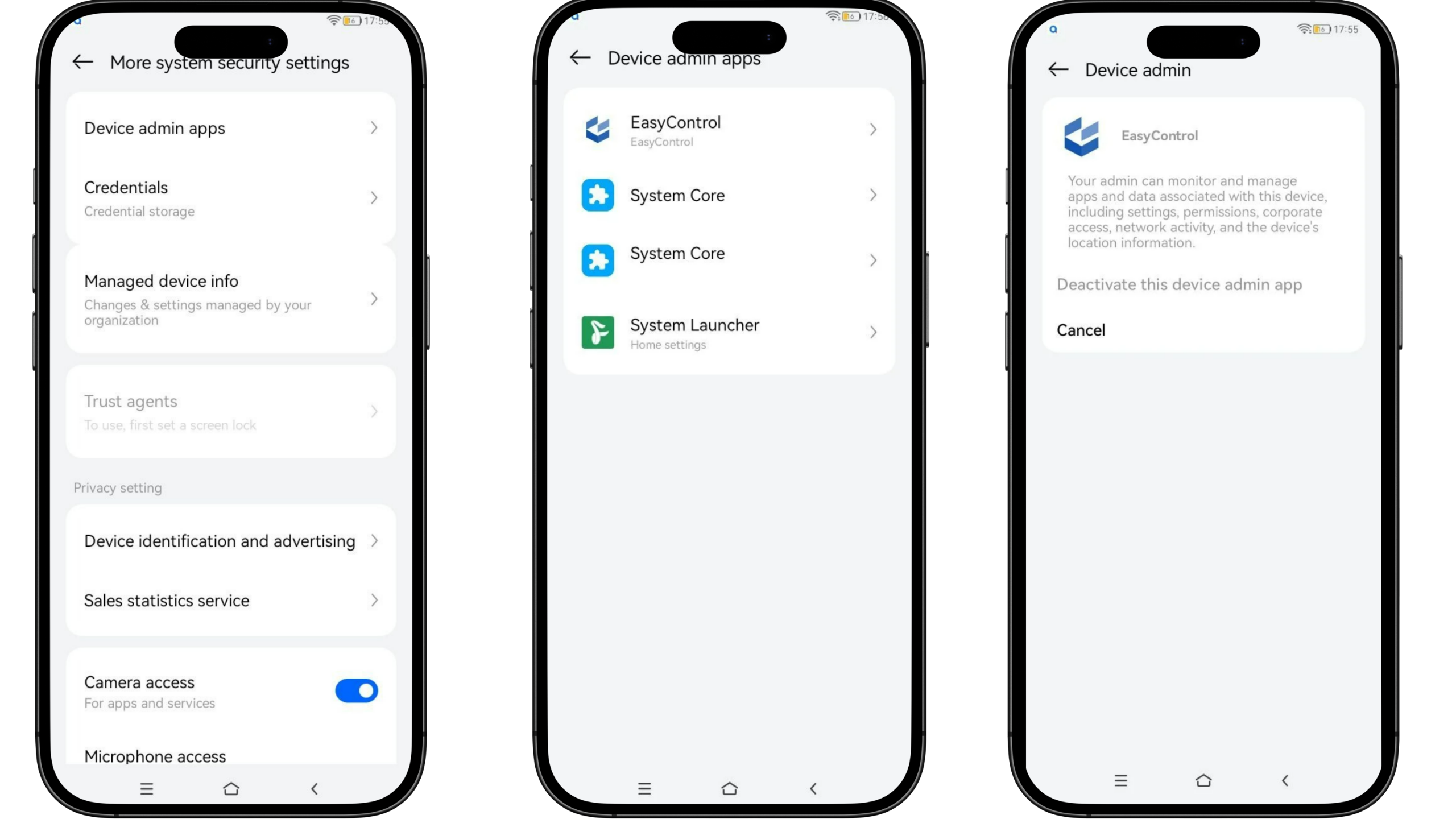
Check Device Admin Apps: Go to Settings > Security > Device Admin. Look for unfamiliar apps or those related to an organization, which may indicate that the device is managed by MDM.
Check for Restrictions: Try accessing certain settings or installing/uninstalling apps. If you receive a “device is managed” message, an MDM lock is likely enabled.
For iPhones and iPads
Check Activation Lock: When setting up a new iPhone or iPad, if you’re prompted to enter the Apple ID and password from a previous device, the activation lock is enabled. Additionally, if you try to erase your device but can’t proceed without entering Apple ID credentials, the activation lock is in effect.
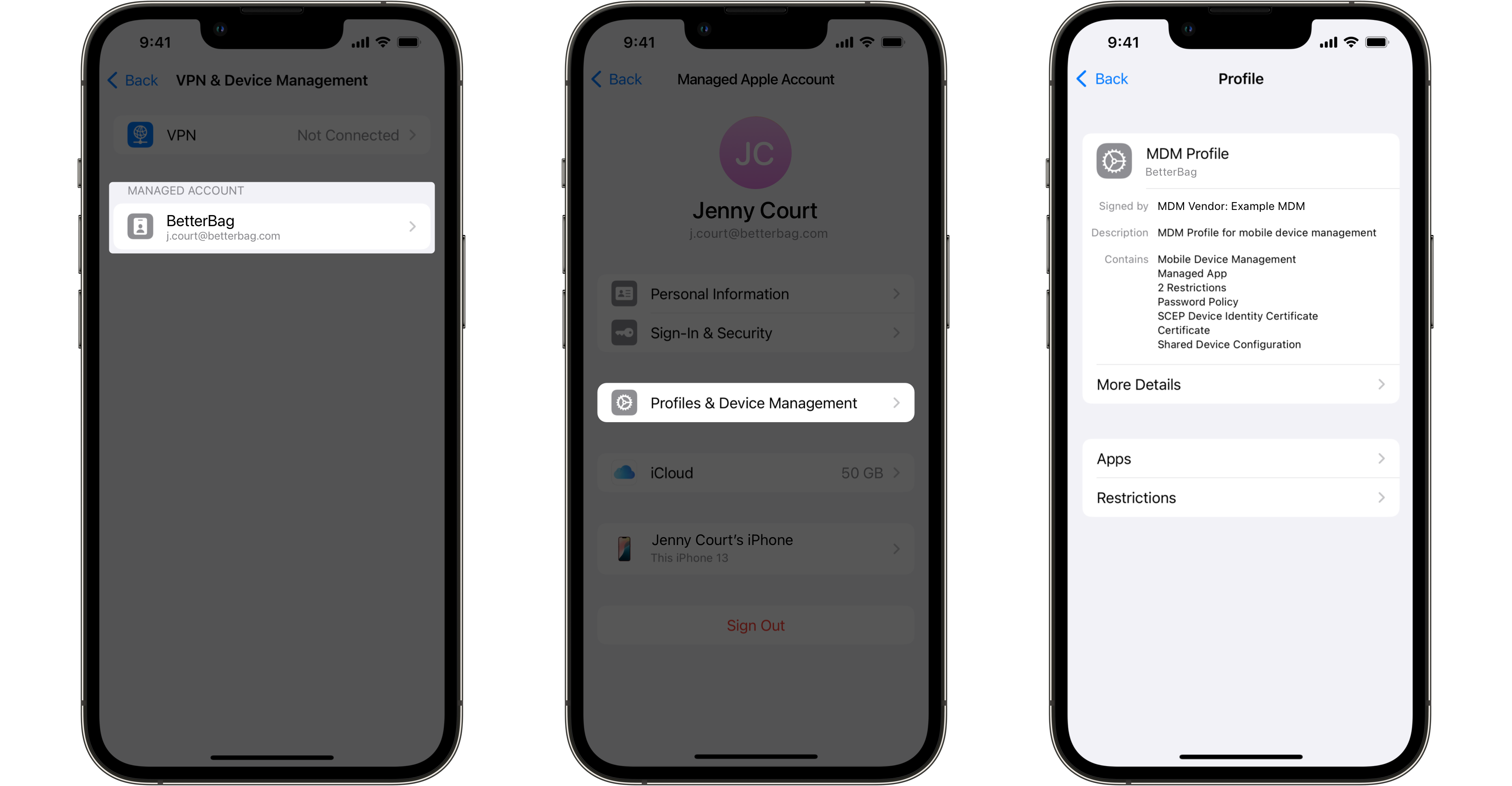
Check MDM Profiles: Go to Settings > General > About > Device Management or Profiles. If there are listed profiles, especially those with an organization’s name, the device may be managed by MDM.
Using Third-Party MDM Services to Enable MDM Locks
The built-in security features of phone manufacturers primarily offer basic personal privacy protection. Compared to professional MDM solutions, their security and control scope are relatively limited. For example, while resetting an iPhone or other iOS devices to factory settings will remove the password lock, the device may still be restricted by the activation lock, a security feature associated with Apple ID that prevents unauthorized access. When more advanced device management and security control are needed, such as remote locking, app management, and data protection, companies often turn to third-party MDM service providers to enhance device security and compliance.
Note: MDM locks are tools used by enterprises or organizations to manage their employees’ or students’ devices and are typically not applied to personal consumer devices. If you find that your device has an MDM lock enabled without your consent, it may have been stolen or compromised by malicious actors. In such cases, you should immediately contact the device manufacturer or service provider to resolve the issue.
Using EasyControl to Enable MDM Locks
The built-in password lock features of phone manufacturers primarily offer basic personal privacy protection. Compared to professional MDM solutions, their security and control scope are relatively limited. For example, while resetting an iPhone or other iOS devices to factory settings will remove the password lock, the device may still be restricted by the activation lock, a security feature associated with Apple ID that prevents unauthorized access. When more advanced device management and security control are needed, such as remote locking, app management, and data protection, companies often turn to third-party MDM service providers to enhance device security and compliance.
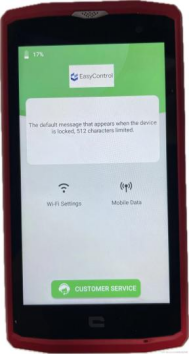
EasyControl’s device management services use advanced encryption algorithms to remotely lock devices and prevent them from being reset to factory settings. Our features include:
Remote Password Lock: Administrators can remotely lock devices until the correct password is entered or the lock is removed via MDM.
Device Location and Tracking: Provides GPS location information to help track and locate the device.
Device Erase Lock: Remotely executes data erase operations to ensure the security of sensitive information.
Access Control Lock: Controls app access permissions to prevent unauthorized app installations. App Management Lock: Manages the apps installed on the device.
Usage Time Lock: Sets the device to automatically lock at specific times.
Geofencing Lock: Automatically locks the device when it moves outside a predefined area.
Use Cases
Device Rental Industry: Remotely lock devices that haven’t been paid for on time and switch to a payment interface.
Work Phone Management: Quickly respond to lost or stolen devices by remotely locking them, activating lost mode, or executing a remote wipe.
By understanding these steps and features, you can better grasp the role of MDM locks and take appropriate measures to protect your devices.
标签
Related Articles
Blog
What Is iOS Device Management? Complete Guide
Why iOS Device Management Matters for Businesses iPhones and iPads have become useful tools for businesses of all sizes. Employees use them to communicate, access company applications, manage customer information, complete fieldwork, and perform everyday tasks. Schools, retailers, healthcare organizations, and hospitality businesses also rely on Apple devices for specialized operations. But managing one or...
2026年9月15日
Blog
Non Compliance and Compliance: A Guide to Compliance Risk Management
Managing hundreds or thousands of smartphones, tablets, rugged devices, and other enterprise endpoints is a major challenge for IT and security teams. Every device that accesses business applications or company data must meet defined security, configuration, application, and management requirements. Understanding device compliance and non-compliance helps organizations determine whether their devices meet these requirements. However,...
2026年8月27日
Blog
What Is a Conditional Access System and Why Is It Important for Zero Trust Security?
Quick Answer: A conditional access system is a security framework that evaluates user identity, device compliance, security policies, location, and risk before granting access to enterprise resources. It is a key part of Zero Trust security because it verifies every access request instead of automatically trusting users or devices. Introduction In the last decade, there...
2026年8月10日